Stacknote
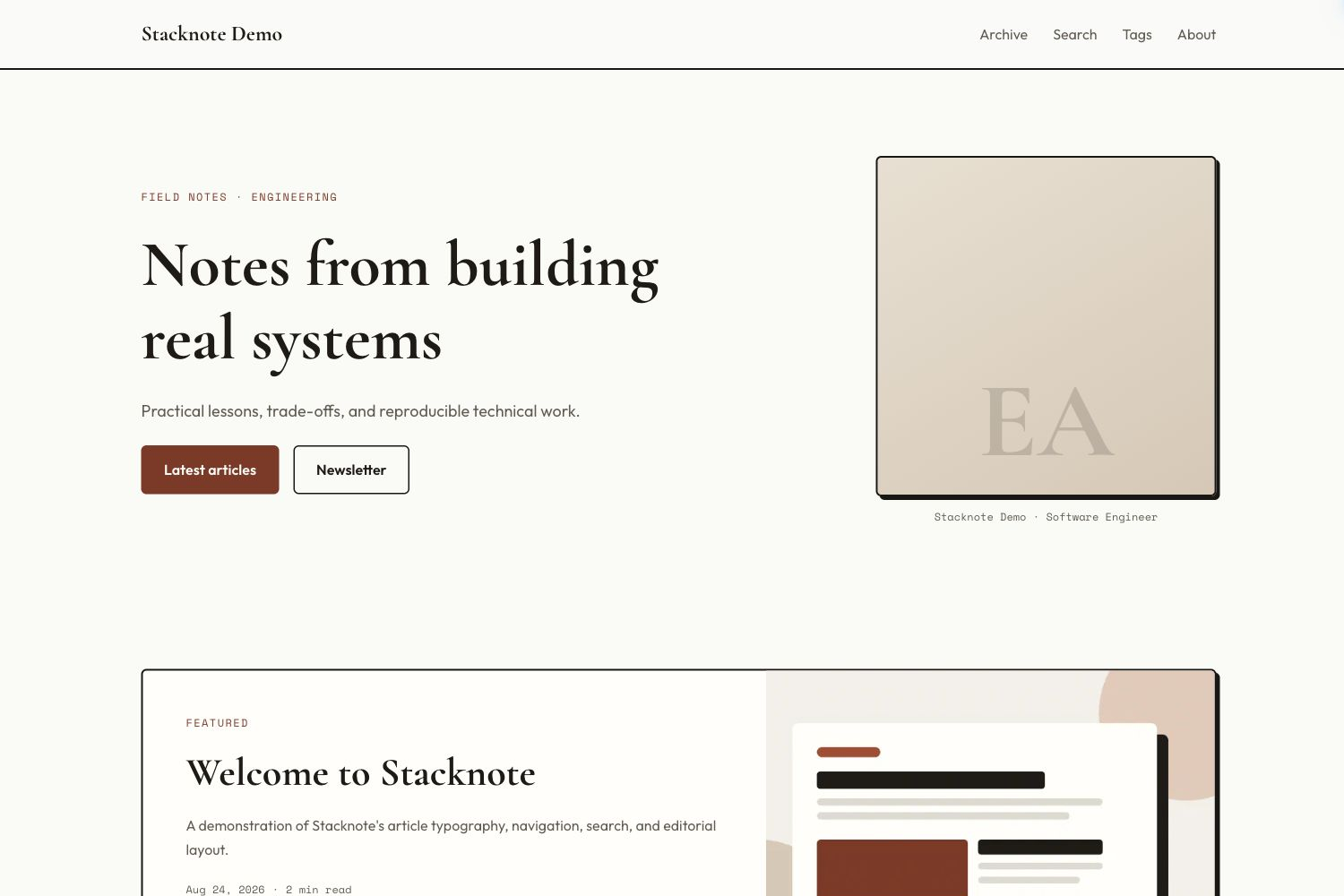
Stacknote is a warm editorial Hugo theme for technical notes and personal engineering blogs. It combines serif display typography, clay accents, hard-shadow cards, responsive image processing, accessible navigation, full-text fuzzy search, and article-focused SEO.
The live design can be seen at wanglong.cv. A self-contained reference site is included in exampleSite/, and a hosted build of it runs at stacknote.wanglong.cv if you want to see the theme with placeholder content only.
Preview
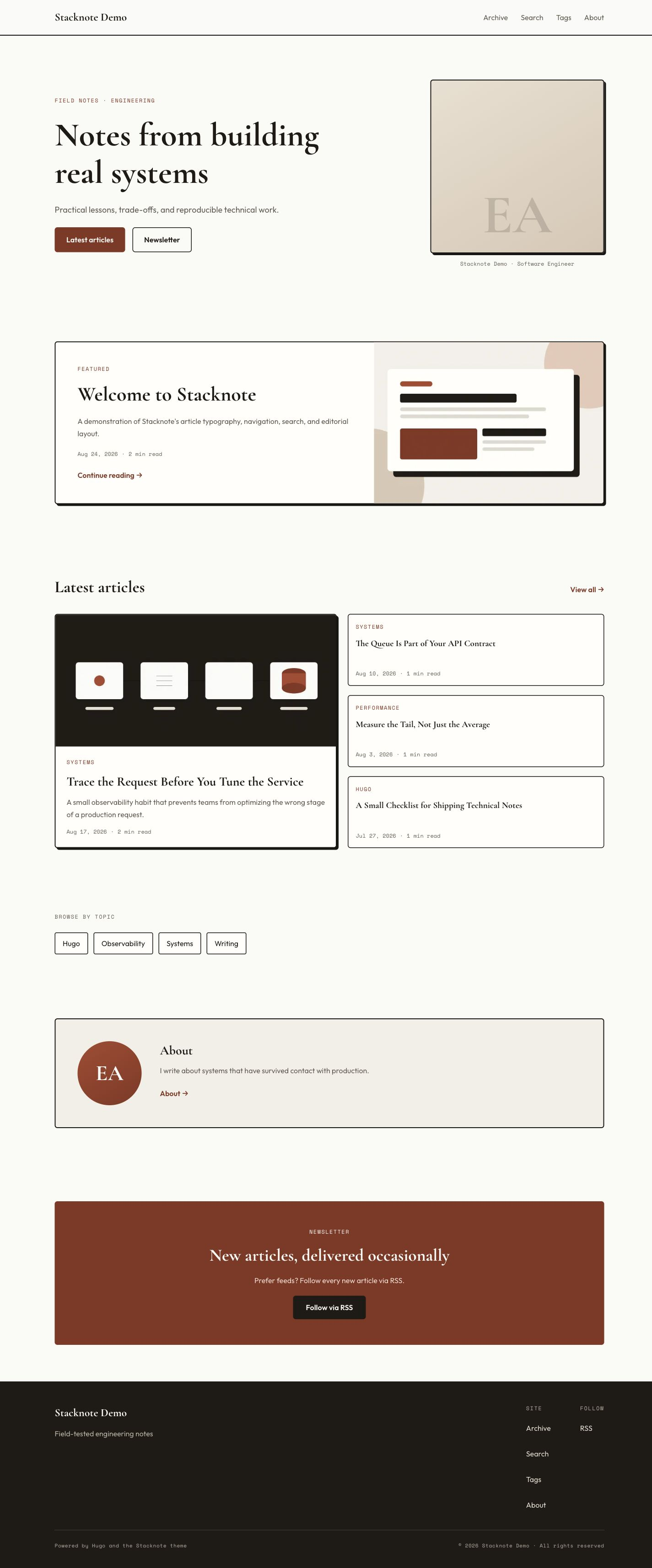
Desktop screenshot · Full desktop page · Mobile screenshot · Full mobile page


Features
- Responsive editorial homepage, article lists, taxonomies, archives, search, and author pages
- Hugo Pipes minification, content fingerprints, and Subresource Integrity
- Responsive WebP covers with
srcsetfor images stored in Hugo Assets - Full-text fuzzy search with loading, empty, error, and retry states
- Table of contents, copyable code blocks, previous/next navigation, and related articles
BlogPosting,ProfilePage, and website JSON-LD- Open Graph and Twitter Card metadata with local or remote social images
- Self-canonical pagination and configurable low-value tag index controls
- Accessible focus states, reduced-motion support, responsive tables, and print styles
- English interface strings kept in Hugo’s i18n layer
Requirements
- Hugo Extended 0.160.0 or newer
- A home-page output named
JSONwhen the search page is enabled
Check your Hugo installation with:
hugo versionThe output must include extended.
Installation
Git submodule
From the root of an existing Hugo site:
git submodule add https://github.com/myimilo/hugo-theme-stacknote.git themes/stacknoteTo update the theme later:
git submodule update --remote --merge themes/stacknoteGit clone
git clone https://github.com/myimilo/hugo-theme-stacknote.git themes/stacknoteTo update a cloned copy:
git -C themes/stacknote pull --ff-onlyThen enable the theme in hugo.yaml:
theme: stacknote
locale: en-US
Quick start
The following configuration provides every homepage section and enables search:
baseURL: https://example.com/
title: Example Notes
theme: stacknote
locale: en-US
enableRobotsTXT: true

pagination:
  pagerSize: 10

taxonomies:
  tag: tags

outputs:
  home: [HTML, RSS, JSON]

params:
  author: Example Author
  authorInitials: EA
  role: Software Engineer
  tagline: Field-tested engineering notes
  description: Practical notes about software and systems.
  homeEyebrow: FIELD NOTES · ENGINEERING
  homeTitle: Notes from building real systems
  homeIntro: Practical lessons, trade-offs, and reproducible technical work.
  aboutIntro: I write about systems that have survived contact with production.
  github: https://github.com/example
  email: hello@example.com
  socialLinks:
    - name: github
      url: https://github.com/example
    - name: email
      url: mailto:hello@example.com
    - name: rss
      url: /index.xml
  mainSection: articles
  authorPage: /about/
  showToc: true
  showTopics: true
  showAbout: true
  showNewsletter: true
  newsletterURL: ""
  minTagPostsToIndex: 2
  themeColor: "#FAFAF7"
Add the main section and optional utility pages:
content/
├── about.md
├── archives.md
├── search.md
└── articles/
    ├── _index.md
└── first-post.mdcontent/articles/_index.md:
---
title: Articles
---content/archives.md:
---
title: Archive
layout: archives
---content/search.md:
---
title: Search
layout: search
sitemap:
  disable: true
---
content/about.md can be a normal Markdown page:
---
title: About
---

Write your author introduction here.
Tags are generated automatically from article front matter. Add the utility pages to the main menu if you want them in the header and footer:
menu:
  main:
    - name: Archive
      url: /archives/
      weight: 10
    - name: Search
      url: /search/
      weight: 20
    - name: Tags
      url: /tags/
      weight: 30
    - name: About
      url: /about/
      weight: 40
Start the development server:
hugo serverBuild the production site with:
hugo --panicOnWarning --minifyConfiguration
All theme-specific options live under params.
| Parameter | Default | Purpose |
|---|---|---|
author |
empty | Author name used in structured data |
authorInitials |
SN |
Initials displayed in the homepage portrait and About card |
role |
empty | Role displayed below the homepage portrait and in author structured data |
tagline |
empty | Short line displayed in the footer |
description |
empty | Site-wide fallback meta description |
seoTitle |
site title | Optional homepage title used for search and social metadata |
homeEyebrow |
empty | Small uppercase line above the homepage title |
homeTitle |
empty | Main homepage heading |
homeIntro |
empty | Homepage introduction below the heading |
aboutIntro |
empty | Text shown in the homepage About section |
github |
empty | GitHub URL shown in the About section and footer |
email |
empty | Email address shown in the About section and footer |
socialLinks |
empty | Ordered list of icon links beneath the footer’s site name; see below |
mainSection |
articles |
Content section used by the homepage, archives, search, and article metadata |
authorPage |
/about/ |
Author page used by links and structured data |
showToc |
true |
Show the article table of contents when headings are present |
showTopics |
true |
Show mature tags on the homepage |
showAbout |
true |
Show the homepage About section when aboutIntro is set |
showNewsletter |
true |
Show the homepage newsletter or RSS card |
newsletterURL |
empty | Subscription URL; an empty value makes the card link to RSS |
minTagPostsToIndex |
2 |
Minimum post count before a tag is listed and allowed to be indexed |
themeColor |
#FAFAF7 |
Browser theme-color metadata |
defaultSocialImage |
empty | Fallback Open Graph image stored under assets/ |
favicon |
built-in favicon | Optional favicon URL replacing Stacknote’s default SVG |
Homepage sections can be disabled independently by setting their show* parameter to false.
Footer social icons
Add socialLinks under params to display an icon row beneath the site name and tagline on the left side of the footer:
params:
  socialLinks:
    - name: github
      url: https://github.com/example
    - name: linkedin
      url: https://www.linkedin.com/in/example/
    - name: x
      url: https://x.com/example
    - name: email
      url: mailto:hello@example.com
    - name: rss
      url: /index.xml
    - name: mastodon
      label: Follow me on Mastodon
      url: https://mastodon.social/@example
Built-in icons: github, linkedin, x, twitter, instagram, youtube, email, and rss. Other names use a generic link icon. The optional label supplies the accessible name and hover tooltip; otherwise the platform name is used. Links open in the current tab.
Links appear in configuration order. Entries with empty URLs are skipped; omitting the list or setting socialLinks: [] hides the row entirely. These links are independent of the existing github and email parameters used by the About section and Follow column. Use a full URL, a mailto: URL for email, or a site-relative path for local destinations.
Google Analytics uses Hugo’s standard top-level configuration rather than a theme parameter:
googleAnalytics: G-XXXXXXXXXXArticle front matter
---
title: A field-tested technical article
date: 2026-07-14
lastmod: 2026-07-14
description: A unique description for search and social previews.
tags: [Hugo, Engineering]
slug: field-tested-technical-article
cover:
  image: images/article-cover.png
  alt: A descriptive explanation of the cover image.
  hiddenInSingle: false
---
description is recommended for article cards, search results, and metadata. If it is missing, Stacknote falls back to summary and then Hugo’s generated page summary.
Local covers
Put local cover files in the site’s Hugo Assets directory, for example:
assets/images/article-cover.pngUse the asset-relative path in front matter:
cover:
  image: images/article-cover.png
  alt: A diagram of the article's main system.
Stacknote creates 480, 800, and 1200 pixel WebP variants. Local cover files must be available through Hugo’s asset pipeline; placing them only under static/ prevents responsive processing.
Remote covers
Remote images are also accepted:
cover:
  image: https://images.example.com/article-cover.jpg
  alt: A remote article cover.
Remote images are rendered directly and cannot receive Hugo’s local resizing or WebP conversion.
Default social image
Store the fallback image under assets/ and configure its asset-relative path:
params:
  defaultSocialImage: images/social-card.png
A 1200 by 630 pixel image is a practical default for Open Graph previews.
Search
Search is optional. To enable it:
- Add
JSONto the home outputs. - Create
content/search.mdwithlayout: search. - Add
/search/to the site menu if desired.
The generated index.json contains the title, URL, date, tags, summary, and searchable text of regular pages in mainSection. Search runs entirely in the browser and does not require an external service.
If search is not needed, omit the Search page and the JSON home output.
Fonts and network access
Stacknote currently loads Cormorant Garamond, Outfit, and Space Mono from Google Fonts. Visitors therefore need access to fonts.googleapis.com and fonts.gstatic.com to receive the intended typography. The CSS includes system fallbacks, but the visual result will differ when those requests are blocked.
Sites with strict privacy, offline, or Content Security Policy requirements can override layouts/partials/head.html and assets/css/style.css in the site project to self-host fonts or use a system stack.
Overriding the theme
Hugo lets a site override theme files without editing the installed theme. Copy a file to the same relative path in the site project. For example:
layouts/partials/footer.html
assets/css/style.css
Site-level files take precedence. This keeps local customizations separate and makes future theme updates easier.
Troubleshooting
Search stays on its loading state
Confirm that the home output contains JSON, rebuild the site, and verify that /index.json exists.
A local cover is not resized
Confirm that the file is under the site’s assets/ directory and that cover.image uses an asset-relative path such as images/cover.png.
The homepage is missing articles
Confirm that articles live under the section configured by params.mainSection. The default is content/articles/.
The build reports that Hugo Pipes or image processing is unavailable
Install Hugo Extended 0.160.0 or newer and verify that hugo version includes extended.
License
Stacknote is released under the MIT License.